Mastering Notion: The Crafting Clarity Checklist
Five months ago, I was staring at a blank Notion page, completely overwhelmed by the potential and the chaos of digital organization. Today, I have a system that not only brings order to my creative projects but has also helped me secure over 130 downloads for my templates. This transformation wasn't accidental; it was engineered through a deliberate framework I developed called the Notion Crafting Clarity Checklist. It's more than a simple to-do list; it's a strategic blueprint for creators, entrepreneurs, and anyone looking to transform their Notion workspace from a cluttered digital drawer into a streamlined engine for productivity and growth.
What Exactly Is the Crafting Clarity Checklist?
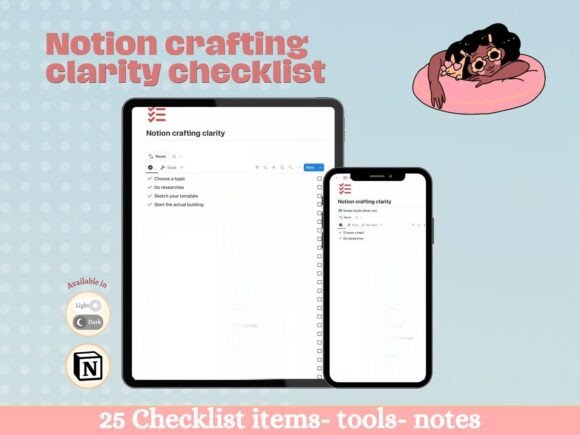
At its core, the Notion Crafting Clarity Checklist is a dynamic, interactive template designed to guide you through the entire process of building effective Notion systems. Think of it as your personal design consultant and project manager rolled into one. Its visual personality is clean, minimal, and intentionally calming—a direct counterpoint to the visual noise that often plagues digital workspaces. The style favors clarity over complexity, using a structured layout with clear headings, ample white space, and intuitive checkboxes that provide a satisfying sense of progress.
The overall appeal lies in its practicality. It’s not about achieving a specific "aesthetic" for its own sake, but about fostering a modern typography of thought—where every element on the page has a purpose. You can add your own tools, notes, and resources directly into the checklist, making it a living document that adapts to your unique workflow. The magic happens when you complete a task: checking it off makes it automatically disappear from your active view, reducing visual clutter and keeping your focus squarely on what's next. This simple yet powerful mechanic is central to its design philosophy.
The Psychology of Clarity: How This Checklist Shapes Your Workflow
The influence of the Notion Crafting Clarity Checklist extends far beyond simple task management. It actively shapes your cognitive process and brand perception. By enforcing a structured approach, it enhances readability—not just of text, but of your entire project. You begin to see the visual hierarchy in your work, distinguishing between core tasks and minor details. This clarity translates directly into professionalism. When your digital workspace is organized, the work that emerges from it—be it a brand identity proposal, a social media calendar, or a client report—inherently feels more polished and consistent.
Consider the difference between a scattered collection of notes and a well-architected system. The latter builds recognition and trust with your audience, whether that's your team, your clients, or yourself. The checklist acts as a design asset for your mind, much like a well-chosen serif font adds authority to an editorial layout or a clean sans serif font ensures legibility in web design. It provides the foundational font pairing for your thoughts—pairing the "what" (your tasks) with the "how" (your structured process).
Applying the Checklist Across Your Creative and Business Projects
The true strength of the Notion Crafting Clarity Checklist is its versatility. It’s a premium font for your productivity, adaptable to any project. For logo design or brand identity projects, use it to track client feedback, asset collection, and revision cycles. In editorial design or publishing, it can manage content calendars, writer assignments, and publication schedules. Marketers and content creators will find it invaluable for planning social media graphics, campaign timelines, and analytics reviews.
Even for personal projects—like planning a wedding, organizing a move, or managing a hobby—it brings the same level of commercial font-like efficiency to your personal life. The key is in its adaptability. You’re not locked into a rigid system. You evaluate its fit by asking: Does this help me see the path from start to finish? Does it reduce the mental load of remembering what’s next? Start by applying it to one small project. Test how it pairs with your existing Notion pages or other digital tools. Review the included task categories and see how they align with your workflow. The best creative font is the one you actually use, and this checklist is designed for daily use.
Practical Guidance for Implementation
Getting started is straightforward. Duplicate the checklist into your Notion workspace. Begin by populating it with the tools you already use—your favorite design software, communication apps, and reference sites. Treat the first week as a testing phase. Note which tasks feel natural and which need adjustment. This is where you add your personal notes and refinements.
For those concerned about commercial use, the philosophy behind the Notion Crafting Clarity Checklist is about enabling success. While the checklist itself is a tool for creation, the templates and systems you build with it are your own. It’s the handwritten font that gives your personal system its unique character, but the stories you write with it are yours to sell, share, or keep. The goal is to give you a robust starting framework, so you spend less time building the engine and more time driving your projects forward. In just five months, this approach took me from a complete novice to a creator with a proven track record. The clarity it provides is the real asset, turning abstract ideas into tangible, successful outcomes.