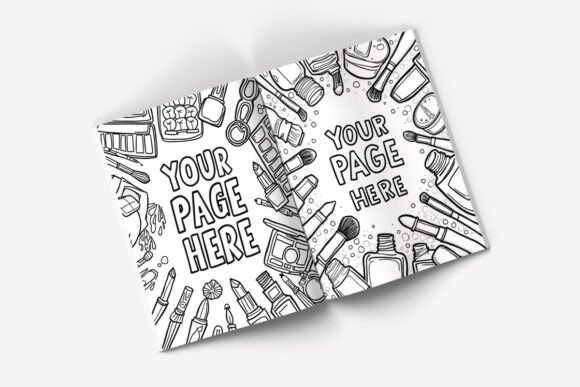
Elevate Your Book Design with This Open Book Mockup
There's a unique challenge in showcasing the interior of a book. A flat, static image of a page doesn't capture the experience of holding an open volume, the way the paper curves into the spine, or the natural flow from one spread to the next. This is precisely the problem a high-quality mockup solves, and the Two Pages Open Book Mockup is a standout tool for any designer, author, or publisher. It provides a realistic, professional stage for your typesetting and layout work, transforming a digital file into a tangible preview that clients and audiences can connect with.
More Than Just a Template: A Tool for Storytelling
This isn't a generic placeholder. The mockup presents an 8.5 x 11 inch book—perfectly sized for novels, reports, catalogs, and manuals—open to reveal two full pages. The visual style is clean, contemporary, and grounded. The book has a subtle, realistic weight and dimension. The pages show a gentle curve where they meet the binding, a critical detail that adds authentic depth. The default setting often includes a softly textured wooden background, which adds warmth and context without competing for attention. This overall aesthetic is versatile; it feels professional enough for a corporate annual report yet inviting enough for a debut novel's promotional material.
The real power lies in its application for editorial design. Whether you're finalizing the layout for a cookbook, a photography portfolio, or a business manifesto, this mockup lets you present your work in situ. Instead of sending a client a PDF, you can send them a JPEG that shows their book on a desk, ready to be read. This simple shift in presentation dramatically improves perception, making the project feel complete and real. It's a vital design asset for anyone involved in publishing, helping to secure approvals and generate excitement.
Practical Applications Across Your Creative Projects
The utility of this Two Pages Open Book Mockup extends far beyond traditional book publishing. Its strength is in visualizing any content that lives on a two-page spread.
- For Authors and Publishers: This is essential for pre-launch marketing. Use it to create stunning social media graphics for Instagram or Facebook, showing off your cover and interior design. It's perfect for your website's book page, Amazon listing images, or media kits sent to reviewers and bookstores.
- For Graphic Designers and Brand Strategists: Showcase brand identity applications. Design a brand style guide or a set of brand guidelines and present them in this mockup. It instantly elevates the perceived value of the deliverable. It's also ideal for presenting catalog designs, lookbooks, or pitch decks for publishing clients.
- For Marketers and Entrepreneurs: Create compelling visuals for lead magnets. If you're offering a free eBook, report, or workbook to build your email list, a professional mockup image can significantly increase conversion rates on your landing page. It signals quality and builds trust before the user even downloads the content.
- For Bloggers and Content Creators: Illustrate articles about writing, design, or your creative process. A well-placed mockup image can break up text, add visual interest, and provide a concrete example of the topic you're discussing.
- For Crafters and Hobbyists: Even for personal projects, presentation matters. Use it to display a family recipe book, a vacation photo album, or a personal journal you've designed. It adds a layer of polish that makes the project feel special.
Key Features That Streamline Your Workflow
A great mockup is defined by its usability. This PSD file is built with the designer's workflow in mind, ensuring you spend less time on technical setup and more time on creative presentation.
- Fully Editable via Smart Objects: The open book is isolated in its own layer group. To apply your design, you simply double-click the smart object layer, paste your artwork, save, and close. The mockup automatically applies the correct perspective, shadows, and texture, ensuring a seamless integration. This process is non-destructive, meaning you can update your design endlessly without harming the base file.
- Customizable Background Options: The included wooden backgrounds provide a ready-made scene, but the background is also fully editable. You can change the color to match your brand palette, apply a different texture, or even place the book on a different surface entirely. This versatility allows you to tailor the scene to the specific mood of your project.
- High-Resolution Quality: With a crisp 3000 x 2250 px resolution, the output is sharp enough for both digital use and small-scale print materials. You can crop in on details without losing quality, ensuring your typography and layout details are clearly visible.
- Organized Layers and a Helpful Guide: The PSD file is logically organized, with layers for the book, shadows, and background separated for easy navigation. A step-by-step PDF guide is also included, making it accessible even for those with basic Photoshop knowledge.
Getting the Most Out of Your Mockup
To use this Two Pages Open Book Mockup effectively, think like a photographer setting up a shot. First, consider your content. The standard 8.5 x 11 inch format is ideal for US Letter-sized projects. If you're working on a different trim size, like a 6x9 novel, you'll need to design your pages to fit within the mockup's dimensions, perhaps with a subtle border or by adjusting your layout's scale.
Next, pay attention to the details within your design. Since the mockup renders your artwork with realistic shadows and curves, ensure your text has proper margins. Text too close to the binding will be obscured by the curve of the page. Use this to your advantage to demonstrate a well-designed interior with comfortable, readable margins.
Finally, think about context. The background you choose sets the entire tone. A dark, moody background might suit a thriller novel, while a clean, white surface could be perfect for a minimalist design portfolio. Test a few options to see what best complements your book's cover and interior design. This thoughtful approach ensures your final presentation isn't just a technical display, but a compelling visual story that engages your audience and professionally showcases your hard work. This mockup is more than a file; it's a bridge between your digital creation and the physical world, and an indispensable tool for modern creative presentation.